

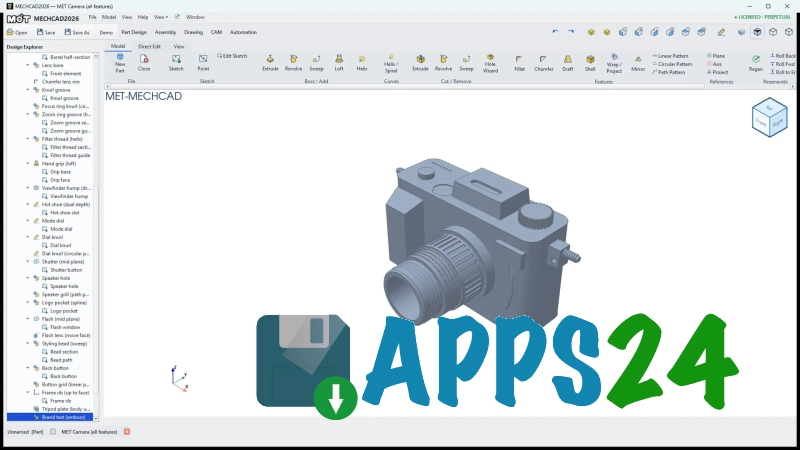
MECHCAD is an engineering CAD system for Windows designed to create and edit mechanical parts, assemblies, and drawings in a unified working environment. The program is intended for preparing 2D documentation and working with 3D models: geometry is built from sketches, individual elements can be refined, and completed projects can be used as a basis for subsequent changes.
MECHCAD can be viewed as a free alternative to FreeCAD for mechanical design tasks. Both solutions focus on parametric modeling and allow users to create parts from sketches, but FreeCAD offers a broader system of specialized workbenches, advanced support for macros and extensions. MECHCAD emphasizes a more direct workflow without the need to understand numerous additional modules.
MECHCAD Features
- Creating two-dimensional sketches using lines, arcs, and other basic geometric elements.
- Building solid parts based on sketches using extrusion and cutting operations.
- Editing individual model elements without completely rebuilding the project, which is convenient when changing the dimensions or shape of a part.
- Creating mechanical components that can be used as part of more complex structures.
- Preparing drawings with views and dimension annotations for subsequent use in technical documentation.
- Working with common CAD data exchange formats, allowing models to be transferred to other engineering applications.
- Viewing a three-dimensional object from different angles to check its geometry before saving or exporting.
MECHCAD is particularly suitable for scenarios where it is necessary to quickly progress from a simple sketch to a finished mechanical part. This approach reduces the number of intermediate steps when preparing a housing, bracket, or another structurally simple shape.
Editor Advantages
- Free distribution allows MECHCAD to be used in educational projects, home workshops, and small engineering tasks without purchasing a commercial license.
- Its focus on mechanical design eliminates the need to configure a universal graphics environment for basic part operations.
- The combination of sketches and solid operations helps maintain a clear model-building logic: dimensions are changed in the original geometry rather than only manually on the finished object.
- Support for 2D and 3D representations makes it possible to use one program both for developing a part and preparing its accompanying drawing.
- Working in Windows makes MECHCAD accessible on computers that already use widely adopted engineering software for this platform.
Disadvantages
- MECHCAD does not replace large industrial suites in projects involving complex assemblies, advanced calculations, and extensive automation of design documentation.
- Its range of specialized tools may be narrower than that of FreeCAD and commercial CAD systems with add-on modules for analysis, CAM preparation, or managing large products.
- When transferring models between different CAD systems, limitations may arise due to the specifics of the supported formats and the conversion of parametric data.
- Mastering precise modeling takes time: the result depends on the sequence in which the sketch is built and the specified dimensions.
MECHCAD is best suited to situations where clear mechanical part creation and the ability to quickly obtain an editable model are more important than the full range of tools offered by a large-scale design platform. Therefore, the program is best regarded as a standalone working tool for small projects and as an accessible addition to an already installed CAD package.
MECHCAD is intended for users who need a Windows editor for developing mechanical parts, checking their shape in 3D, and preparing basic documentation without the expense of a commercial license. The program is suitable for educational tasks, prototyping, and uncomplicated design work, and MECHCAD is distributed free of charge.
What's new in the latest version 2026.6.27
Updated
- Support for three-dimensional parametric design has been added.
- A signed installer for Windows with the verified publisher MET Mechatronics Designed Co., Ltd. is now available.
- Installation options have been expanded: via the winget package manager or a standalone installer with the publisher's certificate pre-installed.










Add comment