

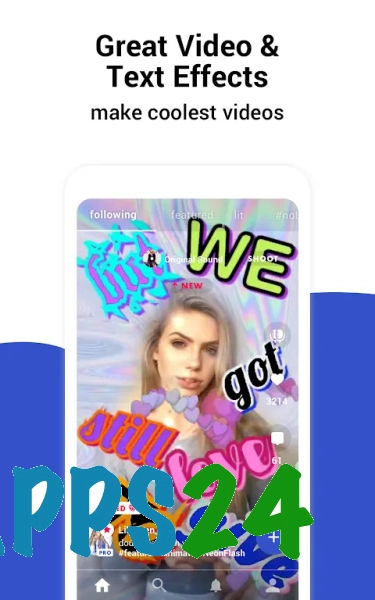
Funimate Video Editor & Maker — a mobile video editor for Android designed to create short, dynamic videos from pre-recorded clips and photos. The app combines video editing with background music, decorative effects and tools for sharing the finished result on social media. The interface is designed for quick, creative editing, making Funimate ideal for music videos, short clips and visual stories without the need for complex preparation.
In terms of its core features, Funimate Video Editor & Maker is comparable to CapCut: both programmes allow you to trim videos, join clips, and add music, text and effects. Funimate emphasises expressive visual effects and short clips, whilst CapCut is more often used as a more versatile editing tool for various video formats.
Funimate Video Editor & Maker really comes into its own in clips where rhythm and a striking presentation are key: a music clip can be enhanced with transitions, captions and animated effects, transforming an ordinary recording into a snappy clip ready for sharing.
Features of Funimate Video Editor & Maker
- Editing video clips by trimming and combining selected parts into a single video.
- Add music to your footage to create clips with the right soundtrack.
- Apply visual effects and transitions to help emphasise scene changes or specific moments in the recording.
- Place text over the video for captions, explanations or short titles.
- Using decorative elements to style the video.
- Working with photographs and video footage within a single project.
- Preparing videos for subsequent sharing on social media.
Advantages of the editor
- Focus on short clips: the main tools are suitable for quickly creating a video from several source clips.
- Combining editing and effects in a single app eliminates the need to process videos separately in different programmes.
- Soundtracks and text elements allow you to tailor a video to a specific theme or mood.
- The app is suitable for editing footage directly on an Android device, without needing to transfer the project to a computer.
- The features are designed not only for technical trimming but also for creating a striking visual style for the finished video.
Drawbacks
- The dramatic effects may prove excessive for the straightforward editing of family or business videos.
- Working with rich effects and large source files depends on the available resources of the Android device.
- For precise, professional editing involving a large number of tracks and complex manual adjustments, Funimate is less suitable than specialised desktop editors.
- The app is primarily designed for short clips, so it is less suitable for creating longer films or full-scale projects.
Perhaps Funimate Video Editor & Maker is best suited to creating short music and themed clips with striking effects directly on an Android smartphone; it is an accessible tool for quick, creative editing, available free of charge.
What's new in the latest version 5.0.20
Updated
- The stability of the application has been improved.
- Bugs that were identified have been fixed.
- The performance of the video editor has been optimised.
- Compatibility with modern Android devices has been improved.














Add comment